Social Media Comment Moderation: A Practical Playbook
Build a social media comment moderation policy that separates criticism from spam, routes risk correctly, and keeps useful customer conversations moving.
Updated July 22, 2026

Social media comment moderation is the process of reviewing comments, applying a documented policy, and taking the least restrictive action that keeps the conversation useful and safe. A good moderation program does not hide every negative comment. It separates legitimate criticism from spam, abuse, unsafe content, and cases that need a private or specialist response.
For most brands, the practical workflow is:
- Leave and reply when a comment is relevant, civil, and answerable in public.
- Move to a private channel when resolving the issue requires order details or other personal information.
- Hide or hold for review when content matches a defined spam, abuse, or safety rule.
- Delete, report, restrict, or escalate only when the platform rule and your policy justify the stronger action.
- Record the reason so similar comments receive consistent treatment and the policy can improve.
The rest of this guide turns that outline into an operating system a team can actually use.
What comment moderation should accomplish
Moderation has three jobs that can conflict if the policy is vague:
- protect customers and team members from scams, threats, harassment, and unsafe material;
- preserve honest questions and criticism that help a brand understand its customers; and
- keep support, sales, and community conversations moving instead of treating every comment as a content-removal problem.
The goal is not a feed with no negative sentiment. A feed that removes all criticism can undermine trust and erase information the support or product team needs. The better target is consistent action based on the comment's content, context, and risk.
Platforms already provide some moderation controls. For example, Facebook Page managers can block words so matching comments are hidden, and YouTube can hold potentially inappropriate comments or comments containing blocked words for review. Those controls are useful, but they do not define your brand's policy. The team still has to decide which criticism deserves an answer, which allegation needs investigation, and which content should never remain public.
A five-action social media comment moderation policy
Use the following actions as the core of the policy. The examples are starting points; adapt them to your products, regulations, platform rules, and risk tolerance.
| Action | Use it when | Example | Important boundary |
|---|---|---|---|
| Leave | The comment is relevant and does not require a response | A customer answers another shopper's sizing question accurately | Monitor the thread in case the context changes |
| Reply | The person asks a public question or raises criticism you can address publicly | “Does this come in a larger size?” | Answer the substance instead of using a generic apology |
| Move private | Resolution requires personal, order, payment, health, or account information | “My package says delivered, but it isn't here” | Explain the public next step, then request only the minimum information privately |
| Hide or hold | The content is likely spam, abusive, deceptive, or caught by a rule that needs review | A repeated crypto promotion under several ads | Do not use sentiment alone as the rule |
| Delete, report, restrict, or escalate | The content violates a clear policy, creates an immediate safety or legal risk, or comes from a repeat bad actor | A phishing link impersonating the brand | Preserve evidence and follow the approved incident path when needed |
Leave relevant criticism visible
“Negative” is not a moderation category. A frustrated customer describing a delayed order is different from a bot posting the same link across twenty ads. The first comment may need a quick acknowledgement and a private handoff; the second may warrant hiding, reporting, and blocking.
When criticism is specific and civil, leave it visible and respond to the issue. This shows other readers that the brand listens, and it prevents moderation from becoming a way to suppress uncomfortable but useful feedback.
Reply where the answer helps everyone
Public questions about product use, ingredients, availability, sizing, policies, or campaign terms often deserve a public answer. Other shoppers may have the same question. A strong reply should:
- address the actual question in the first sentence;
- use a current product or policy source;
- avoid requesting private information in public; and
- state the next step when the answer depends on an order or account.
Avoid replying only with “DM us” when a safe, useful public answer is available. Move the conversation privately at the point where the resolution becomes customer-specific.
Hide or hold based on behavior and risk
Hide or hold comments when the content matches a documented rule: impersonation, scams, repeated unsolicited promotion, slurs, targeted harassment, explicit material, dangerous misinformation in a regulated context, or another category your policy defines.
On a Facebook Page, Meta says a manually hidden comment remains visible to its author and the author's friends but is hidden from everyone else; replies to that comment are hidden as well. Meta separately states that Page keyword controls can hide comments containing blocked words and common variations. Because visibility and available controls can differ by surface, confirm the current platform behavior before making a customer promise.
Keyword rules work best for stable, unambiguous patterns such as a recurring scam domain. They work poorly for ordinary words that appear in both abusive and legitimate conversations. Review false positives and keep an allow-list or exception process where the tool supports it.
Delete or report only with a clear reason
Deletion is appropriate when leaving the content available—even to the author and their network—creates unnecessary risk, or when the platform does not offer a suitable hold or hide action. Reporting is appropriate when the content may violate platform rules, such as impersonation, threats, or coordinated spam.
Write down which roles may take each action. A community manager may be authorized to remove obvious spam, while threats, product-safety reports, legal claims, or suspected fraud may require a specialist. Stronger actions should have stronger evidence and a clearer audit trail.
How to build the workflow
1. Inventory the comments you actually receive
Review a representative sample across paid ads, organic posts, campaigns, launches, and high-volume periods. Group comments by the decision they require, not merely by positive or negative sentiment.
Useful categories include:
- product or pre-purchase question;
- order or account support;
- constructive complaint;
- repeated FAQ;
- creator, wholesale, or press inquiry;
- spam or unsolicited promotion;
- harassment or discriminatory abuse;
- impersonation or fraud;
- safety, legal, or regulatory escalation; and
- irrelevant but harmless conversation.
This inventory becomes the evidence for the policy. It also exposes where a missing product page, unclear return policy, or confusing campaign is creating avoidable comment volume.
2. Define an action and owner for every category
For each category, document:
- the default action;
- exceptions that change the action;
- who owns the first response;
- when the case moves to another team;
- what information may be requested and in which channel; and
- what the moderator records after acting.
Do not write “use judgment” as the entire exception policy. Give moderators examples of similar-looking comments that require different decisions. A message containing “scam” could be a bot promotion, a customer accusing the brand of fraud, or a warning about an impersonator. Each needs a different response.
3. Create response and escalation playbooks
Prepare short, editable reply patterns for frequent low-risk situations, then specify where a person must adapt them. Include the source of truth for product and policy facts.
An escalation entry should answer four questions:
- What triggers the escalation?
- Who receives it?
- What evidence and context travel with it?
- What should the public moderator say while the review is pending?
Sensitive cases should not wait in the same general queue as ordinary FAQs. Build a separate path for threats, safety reports, discrimination, legal requests, account compromise, and high-reach incidents.
4. Automate narrow, reversible decisions first
Start automation with high-confidence patterns and an easy recovery path. Repeated spam links, a known impersonation phrase, or a clearly defined profanity rule are safer first candidates than an instruction to hide all “negative” comments.
For uncertain classifications, route the comment for review instead of taking an irreversible action. YouTube's own moderation documentation notes that automated detection may not always get it right and gives channel owners review options. The same operational principle applies across tools: confidence should determine whether the system acts, drafts, queues, or escalates.
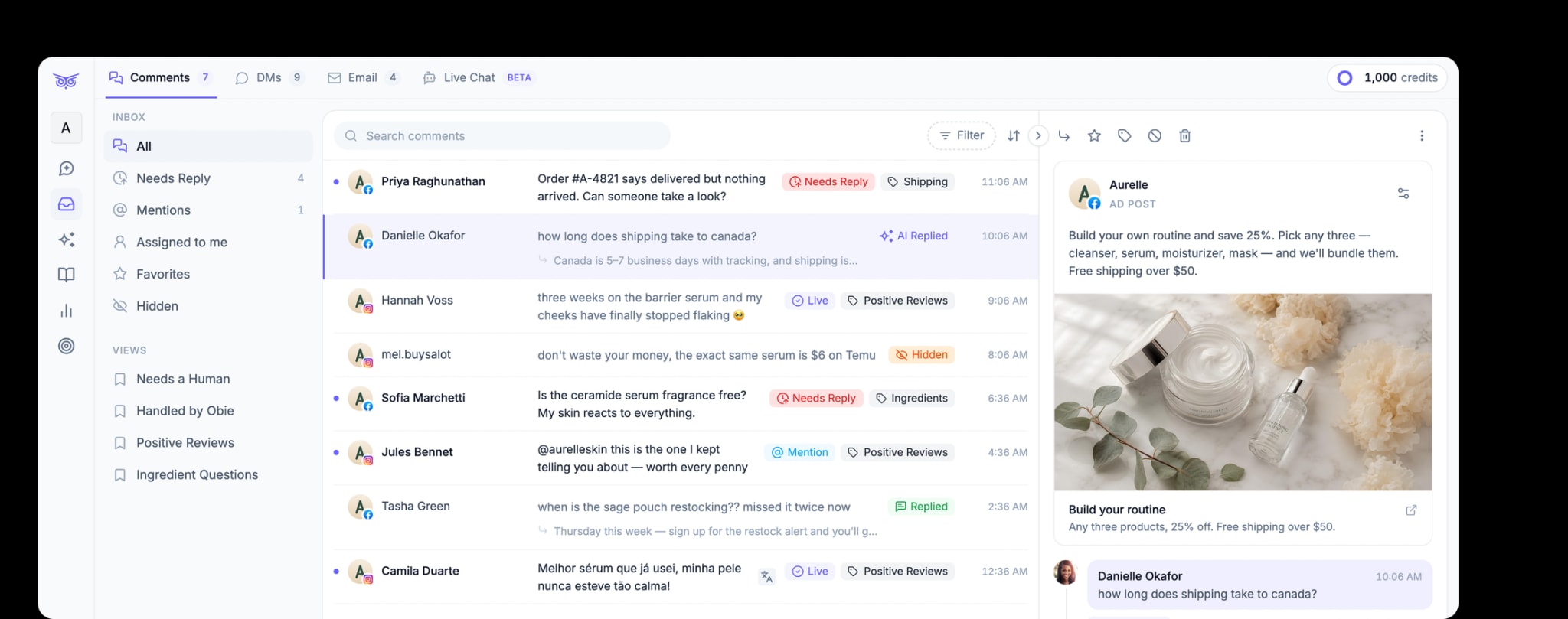
Brandwise can moderate comments on paid and organic social posts, hide spam or harmful and off-brand comments, respond to engagement, and manage social direct messages. Teams can choose what to automate and keep people involved for complex or sensitive work. For a first-time setup, define the policy before configuring any tool. See how Brandwise handles social media management.
5. Review decisions, not just volume
Track enough information to improve the system:
- comments reviewed by category and channel;
- action taken and reason;
- false hides, false approvals, and reversed decisions;
- questions that repeatedly lack an approved answer;
- time to first useful response for comments that need one;
- escalations that missed their owner; and
- recurring complaints or product questions worth sharing with another team.
A raw count of hidden comments can increase because spam increased, because the filter became too aggressive, or because the team changed its policy. Pair counts with reason and quality checks before interpreting them.
Platform controls to verify before launch
Platform interfaces and permissions change, so use platform-owned guidance as the source of truth during setup.
- Facebook documents what happens when a Page hides a comment and how Page managers can block words in comments.
- YouTube documents its current comment moderation settings, including hold-for-review levels, blocked words, and link controls.
- Instagram professional accounts can manage supported comments and messages through Meta Business Suite Inbox, subject to account setup and availability.
Test each rule from an account outside the moderation team. Confirm what the commenter, their friends, and the general public can see; verify that replies are handled as expected; and make sure moderators can reverse an incorrect action.
A launch checklist for comment moderation
Before turning on a new policy or automation, confirm that:
- every category has a default action and named owner;
- legitimate criticism is not treated as spam by default;
- public replies never request sensitive information;
- safety, legal, fraud, and threat cases have a separate escalation path;
- automated rules have been tested against matching, near-matching, and non-matching comments;
- uncertain cases can be reviewed before action;
- moderators can reverse mistakes and record why they happened; and
- the team will review real decisions after launch and update the policy.
Begin with one channel and a small set of clear rules. A useful moderation system gets more consistent as the team learns; it does not try to predict every edge case on day one.
If comment volume now exceeds what native filters and manual queues can handle, Brandwise can moderate paid and organic social comments, hide configured categories of unwanted comments, and respond to engagement. Teams can decide what to automate and where people remain involved. Start with the highest-confidence category, then expand after checking real decisions.