How to Automate Social Media Customer Service for Ecommerce
A practical ecommerce guide to automating comments and DMs with an action matrix, authority levels, rollout stages, and resolution metrics.
Updated July 22, 2026

A safer way to automate social media customer service is to automate classification first, low-risk actions second, and sensitive decisions last. Give every comment or direct message one of five outcomes—reply publicly, move to DM, hide, ignore, or escalate—and define exactly when software may take that action without approval.
That approach is slower to start than switching on blanket auto-replies. It is also far easier to trust. A good system does not try to answer everything. It responds quickly when the answer is known, protects private information, leaves legitimate criticism visible, filters genuine abuse, and hands uncertain or high-impact cases to a person with context.
This guide shows how to build that system for an ecommerce brand, whether you begin with native platform tools, a shared inbox, or an AI customer-service platform.
What social media customer service includes
Social customer service is the work of helping customers and potential customers through comments, mentions, and private messages. It overlaps with community management and moderation, but it has a different test of success: did the person get a useful answer or a clear path to resolution?
For an ecommerce team, the incoming work usually includes:
- organic post comments and replies;
- comments on paid ads;
- direct messages and message requests;
- mentions or tags that expect a response;
- product, shipping, return, or policy questions;
- buying questions about fit, availability, or use;
- complaints, criticism, spam, abuse, and safety reports.
Publishing posts is not social customer service. Social listening is not the same thing either: listening detects conversations and themes, while customer service owns the response and follow-through. One system may support all three, but the policies should remain distinct.
Start by listing every inbox and comment surface your team actually monitors. Record the account owner, business hours, normal volume, peak periods, languages, and the system that contains order or policy information. Do not automate an inbox that nobody owns when the automation fails.
Native tools are a reasonable starting point. Meta Business Suite Inbox can bring messages and comments from supported Meta channels into one place, organize follow-up, and run some keyword-based message automations. Platform capabilities and permissions can vary by account, region, and surface, so verify the available actions inside the accounts you manage.
Classify before you act
An automation should not decide from sentiment alone. “This is sick” may be praise; “I still haven’t received it” may be calm language describing a serious service failure. A useful classification has four parts:
- Intent: Is this person asking a product question, seeking an order update, requesting a return, reporting harm, expressing an opinion, or posting spam?
- Privacy: Would a useful answer require an order number, address, email, payment detail, health information, or other personal data?
- Risk: Could the response create a financial promise, safety issue, legal claim, account-security problem, or public escalation?
- Confidence: Does the system have current, approved information that directly supports the proposed action?
Sentiment is a supporting signal, not a verdict. Use it to change tone or raise priority, not to suppress criticism. Likewise, a keyword can route a message without proving its intent. “Refund” could be a policy question, a demand tied to a specific order, or a scam comment.
The classification record should preserve the original message, channel, post or ad, time, detected intent, proposed action, reason, confidence, and final action. That gives reviewers enough information to find weak rules and reverse bad moderation decisions.
The reply, DM, hide, ignore, or escalate matrix
Use this matrix as the default policy, then adapt it to your products, risk tolerance, and channel rules.
| Situation | Default action | Why | Automation boundary |
|---|---|---|---|
| Common product or policy question with a current, public answer | Reply publicly | The answer helps the asker and other readers. | Auto-reply only from approved source material; escalate contradictions. |
| Order-specific shipping, return, account, or payment issue | Move to DM | Resolution may require private information. | Publicly acknowledge, invite the person to DM, and never ask for sensitive details in a comment. |
| Legitimate criticism or a negative product experience | Reply publicly, then DM if needed | A visible, useful response builds more trust than removing fair criticism. | Draft or approve when facts are disputed, the customer is highly distressed, or compensation may be involved. |
| Obvious repetitive spam, scam, malicious link, or unrelated promotion | Hide; report or block when appropriate | It adds risk without contributing to the conversation. | Auto-hide only on narrow, repeatedly reviewed patterns; retain an audit trail and reversal path. |
| Harassment, hate, credible threat, self-harm language, or illegal content | Escalate and apply the safety policy | The case may require preservation, reporting, or an urgent specialist response. | Automation may prioritize and restrict visibility under an approved rule, but a trained person owns the decision. |
| Tag-only comment, emoji reaction, friendly banter, or message with no clear request | Ignore or lightly acknowledge | A full service reply can feel robotic and create noise. | Use a reaction only when it fits the brand; do not chase every interaction. |
| Safety allegation, adverse reaction, chargeback threat, legal threat, media inquiry, or account takeover | Escalate immediately | The downside of a confident but wrong response is high. | No autonomous substantive reply beyond a pre-approved acknowledgement. |
| Question with missing, outdated, or conflicting source information | Escalate or ask a clarifying question | Uncertainty is a workflow state, not permission to invent an answer. | Block auto-send below the chosen evidence and confidence threshold. |
The matrix is intentionally asymmetric. Public replies can be automated for a narrow set of known questions. Hiding should require stronger evidence because it changes what other people can see. Financial, safety, legal, and identity-sensitive cases should have the highest approval requirement.
When to reply publicly
Reply in public when the answer is useful to other readers and does not expose private data. Good candidates include product dimensions, published material or care guidance, store availability, a public shipping policy, and clarification of a promotion whose terms are already approved.
Keep the first reply complete enough to help. “DM us” is not a useful default when the question has a public answer. If the issue later becomes account-specific, state what you can publicly and move only the private part to DM.
When to move to DM
Use DM when resolving the request requires identity verification or order details. The public bridge should acknowledge the actual issue: “We can help check that delivery. Please send us a DM with your order number.” Do not ask the customer to publish an email address, order number, street address, or payment information.
A move to DM is not a resolution. The case remains open until the customer receives the promised answer or action, or until your documented closure rule is met.
When to hide
Hide content because it matches a written moderation policy—not because it is inconvenient or negative. Strong candidates include obvious scams, malicious links, repetitive promotions, hate, and targeted abuse. Fair criticism, competitor comparisons, pricing objections, and reports of a poor experience usually deserve a response rather than suppression.
Platform behavior matters. Instagram says a manually hidden comment on your post remains visible to you and the commenter, while other people cannot see it; the commenter is not notified. Its Hidden Words guidance also explains automated filtering and custom word lists. Facebook provides Page comment-management controls, including hiding and bulk actions, in its comment manager guidance. Check the current help documentation for the exact account and surface before encoding a rule, because hiding, deleting, reporting, and blocking are not interchangeable.
When to ignore
Ignoring is a deliberate action when no service response is needed. An emoji, a friend tag, or a generic “nice” may not benefit from a written reply. Ignoring also avoids amplifying obvious engagement bait.
But silence is not appropriate merely because a question is hard. An unresolved product, order, safety, or policy request belongs in the queue even when the first useful action is escalation.
When to escalate
Escalate when the system lacks authority, information, or confidence—or when a rule marks the situation as sensitive. Route to a named owner, not a generic “human” queue. Examples include CX leadership for unusual compensation, operations for widespread delivery failures, security for account takeover, legal or compliance for regulated claims, and product or safety specialists for harm reports.
Define an urgent path with an acknowledgement, owner, response target, and backup owner. The goal is not to make AI decide the case; it is to make sure the right person receives the original message, context, proposed next step, and any relevant order or conversation history.
Set authority levels for automation
“AI on” and “AI off” are not useful governance choices. Assign authority per intent and action.
Level 0: observe and classify
The system labels messages, detects likely spam, identifies urgency, and recommends an action. It sends nothing and hides nothing. Reviewers compare its decisions with their own.
Use this level to discover missing intents, ambiguous language, and policy gaps without customer-facing risk.
Level 1: draft for approval
The system writes a reply or recommends a moderation action, but a person approves, edits, or rejects it. Require reviewers to record why they changed it; those reasons reveal where source material and rules need work.
This is the right starting point for complaints, unfamiliar product questions, and brand-voice testing.
Level 2: auto-send low-risk answers
The system may send replies for a narrow, tested set of intents backed by current approved sources. Examples might include published store hours, a documented size chart, or a public return-policy link. Set a minimum confidence threshold and block sending when sources conflict or required context is missing.
Level 3: take reversible actions
The system may perform approved actions that can be easily undone, such as applying a label, assigning an owner, marking follow-up, or hiding only a tightly defined class of confirmed spam. Reversibility does not make an action harmless, so monitor every action and make reversals easy.
Level 4: sensitive or hard-to-reverse action
Refund decisions, material compensation, account or order changes, safety responses, legal statements, deletion, blocking, and similar actions require explicit approval unless a carefully governed workflow has a compelling reason otherwise. For most teams beginning social automation, these should stay human-owned.
Authority should be granted to a specific action for a specific intent—not to a channel as a whole. A system may auto-answer size-guide questions on Instagram while only drafting replies for delivery complaints in the same inbox.
Ground answers in approved knowledge and voice
Automation quality depends less on a clever prompt than on the sources it is allowed to use. Create a small, owned knowledge set containing current policies, product facts, promotion terms, shipping regions, escalation contacts, and prohibited claims. Give each source an owner and review date.
Then define response rules:
- answer only from approved sources;
- prefer the most specific current policy;
- do not infer stock, delivery dates, compatibility, or eligibility;
- disclose uncertainty with a clarifying question or handoff;
- never request private data in public;
- do not promise a refund, replacement, discount, or deadline without authority;
- match the customer's language and emotional intensity without imitating abuse;
- keep public answers concise and make the next step explicit.
Brand voice should constrain wording, not override truth. A playful brand still needs a plain, respectful response to a lost order. Provide positive examples and counterexamples for each high-volume intent so reviewers can see the boundary.
Example: For “Does this run small?” a grounded answer can cite the current size guide and ask which measurement the shopper is comparing. A bad answer invents a universal fit recommendation.
Example: For “Your product damaged my skin,” an unsafe reply debates the claim or recommends treatment. A safer workflow acknowledges the report, avoids medical advice, moves private details out of the thread, and routes it to the designated safety owner.
Example: For “This ad is misleading,” automatically hiding the comment because it is negative destroys useful evidence. The system should preserve it, identify the disputed claim, and route it for a factual public response.
Roll out in stages
Stage 1: baseline and policy
Sample recent comments and DMs across organic and paid posts. Create the intent list, matrix, owners, urgent paths, knowledge sources, and current baseline metrics. Include awkward edge cases—not only easy FAQs.
Stage 2: shadow mode
Run classification without sending for at least one representative business cycle. Compare recommended and human actions. Review false hides, missed urgency, unsupported answers, privacy mistakes, and tone failures by intent and channel.
Stage 3: draft mode
Let the system draft low- and medium-risk replies while people approve them. Start with one account, language, and limited set of intents. Track approval rate and substantive edit reasons, not just whether somebody clicked “approve.”
Stage 4: narrow auto-action
Auto-send only the intents with reliable sources and a strong review record. Expand one boundary at a time. Keep sensitive categories approval-only. Audit a sample of correct-looking actions as well as flagged failures, because confident errors may not attract complaints immediately.
Stage 5: controlled expansion
Add accounts, languages, actions, or hours only after reviewing the preceding stage. Re-test after policy changes, product launches, promotions, channel updates, and major shifts in message mix. Maintain a kill switch and a named person who can use it.
Avoid a “launch day” that grants broad autonomy at once. A reversible progression makes it possible to learn whether the weak point is classification, source quality, authority, tone, routing, or staffing.
Measure resolution, not activity
Automation reports often make reply volume look like success. Define the denominator and outcome before reviewing performance.
- Eligible coverage: the number of in-scope interactions that received the required action divided by all in-scope interactions. Exclude obvious no-response interactions only through a written rule.
- First-response time: elapsed time from receipt to the first useful response—not an instant acknowledgement that gives no answer or next step.
- Resolution rate: resolved cases divided by cases eligible for resolution. Count a case as resolved only when the requested answer or authorized action was delivered and no further team action remains.
- Reopen rate: resolved cases that return for the same issue within your chosen review window divided by resolved cases. Publish the window alongside the rate.
- Escalation rate: cases transferred to a person divided by cases handled by the automated workflow. Segment by intent; a high safety-case escalation rate can be correct.
- Substantive edit rate: approved drafts whose facts, action, policy, or meaning required a human change divided by approved drafts. Punctuation-only edits should not count.
- Moderation reversal rate: hidden, blocked, or deleted actions later reversed divided by all such actions. Review this by rule and channel.
- Unsupported-answer rate: sampled replies containing a claim not supported by the approved sources divided by sampled replies.
- Customer-effort proxy: follow-up turns, repeated requests, or transfers required before resolution. Define the exact proxy rather than giving it a reassuring label.
- Theme yield: recurring, evidence-backed customer themes accepted by an owner for investigation—not every automatically generated topic.
Do not collapse these into one automation percentage. A workflow can increase coverage while hurting resolution, or lower response time while increasing reopen rate. Read metrics together and compare like-for-like intents.
If social interactions lead people to a website action, track that separately from service resolution. Google Analytics defines a key event as an event measuring an action important to the business. A product-page visit, signup, or purchase may be valuable downstream behavior, but it does not prove the support conversation itself was resolved.
Common automation failures—and the better rule
Failure: Auto-reply to every message. Better rule: require a recognized intent, approved source, sufficient context, and action-level authority.
Failure: Hide all negative sentiment. Better rule: distinguish fair criticism from abuse and spam; preserve criticism and answer the underlying issue.
Failure: Send every complaint to DM. Better rule: answer the public portion publicly, then move only private investigation to DM.
Failure: Treat a reply as resolution. Better rule: keep ownership until the requested answer or action is complete.
Failure: Measure only average response time. Better rule: pair speed with resolution, reopen, edit, escalation, unsupported-answer, and reversal rates.
Failure: Use one authority setting for the whole inbox. Better rule: grant authority by intent and action, with stricter boundaries as consequences increase.
Failure: Expand after a quiet week. Better rule: test through a representative cycle that includes promotions, launches, weekends, and known volume spikes.
Where a platform can help
You can implement this operating model with native tools and disciplined team processes. As volume and channel count grow, a shared system can make classification, approved knowledge, routing, review, and measurement easier to manage.
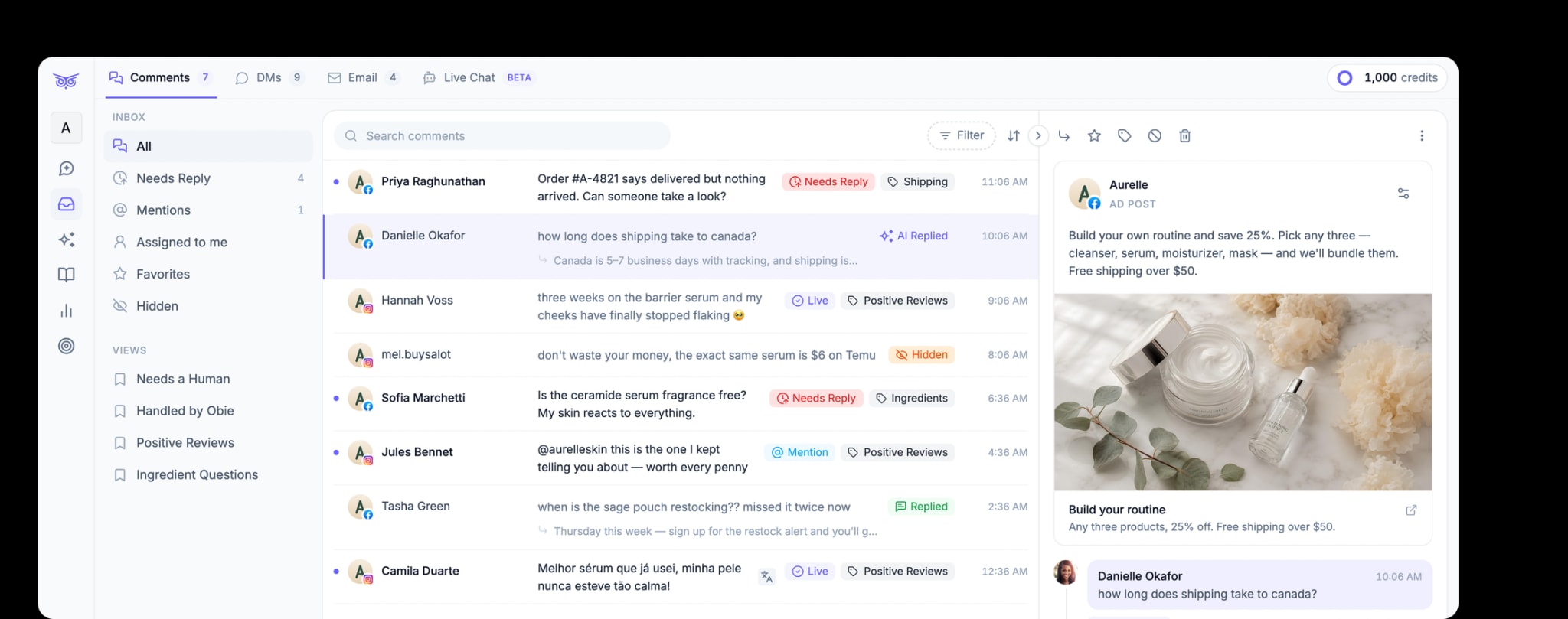
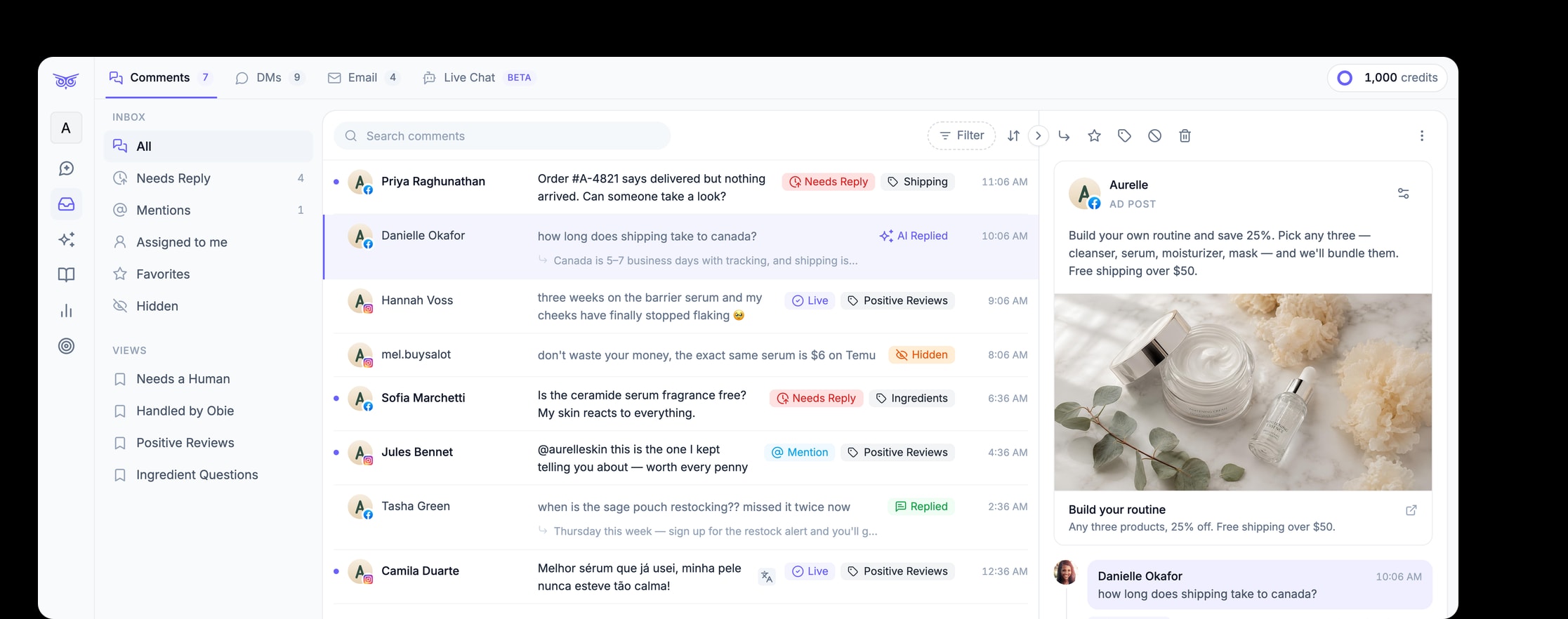
Brandwise is an AI-agent platform for online and direct-to-consumer brands. Its social media tools can help teams moderate paid and organic comments, respond to engagement, manage direct messages across supported social channels, and keep people involved for complex or sensitive work. Brandwise can also bring social engagement, email, and live chat into one inbox experience. Its AI workflows can use approved brand and product information as context; the exact sources and actions available depend on the configured workflow.
Those capabilities do not remove the need for a policy. The matrix, authority levels, source ownership, staged rollout, and outcome definitions still belong to your team. If you are evaluating a platform, ask it to demonstrate those controls on your real edge cases—not only its easiest answers.
The practical starting point
Choose one account and one week of representative interactions. Label what should be replied to publicly, moved to DM, hidden, ignored, or escalated. Write the reason for each decision. Then identify the smallest group of common, low-risk questions with current approved answers.
Run those questions in shadow mode before anything is sent. When the recommendations are reliable, move to draft approval. Only then grant narrow auto-send authority. Keep every other case visible, owned, and measurable.
The goal is not maximum automation. It is dependable customer service with faster handling where the answer is known—and clear human control wherever it is not.